

Punjab Public Service Commission (PPSC) has fully transferred its recruitment system to an online model. Whether you are applying for PPSC lecturer jobs, Punjab Police Sub Inspector posts, medical officer vacancies or any other PPSC government jobs, the only authentic way to submit your application is through the official website at www.ppsc.gop.pk. Understanding the online application process is therefore essential if you want to successfully apply for PPSC jobs today, whether the advertisement is for 2023, 2024 or any upcoming year.
The PPSC online system centralizes everything: advertisements, applying, fee instructions, roll number slips, test schedules and results. At the same time, many fake job portals and social media pages try to misuse the PPSC name, so knowing exactly how to apply online for PPSC jobs via the official website is not just a convenience, it is also a protection against fraud.
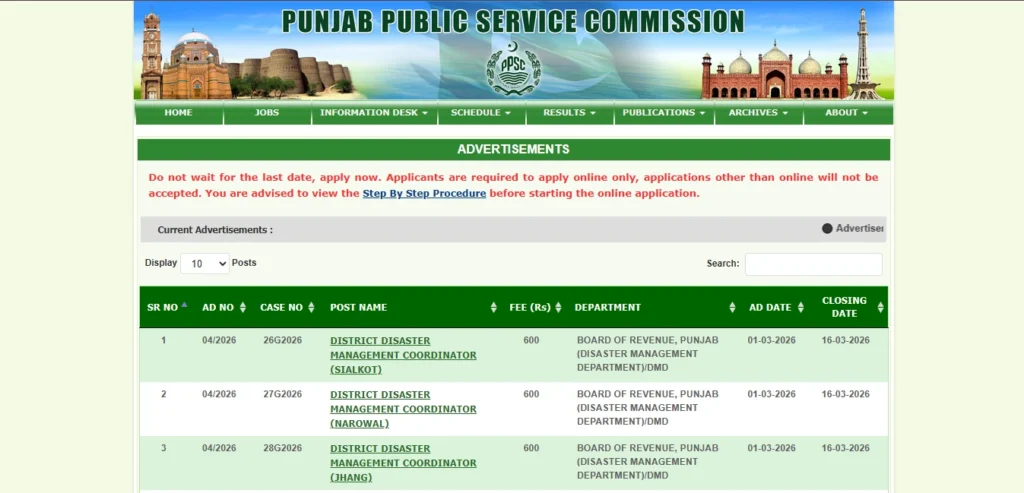
Understanding the Official PPSC Online System
The online application system for PPSC jobs is hosted only on the domain https://www.ppsc.gop.pk. This domain ending with “.gop.pk” confirms that it is an official Government of Punjab website. Any PPSC link that does not end with this domain name should be treated with caution and verified before use.
Within this website, PPSC maintains different sections such as “Latest Jobs” or “Advertisements” for current vacancies, “Apply Online” or “Online Systems” for submissions, “Roll Number Slips”, “Results”, “Job Planner” and other important information. When you see any post or message about “ppsc jobs apply online”, “ppsc jobs 2023 online apply” or “ppsc jobs apply”, the final destination must be a link inside www.ppsc.gop.pk; otherwise, it is not an official application channel.
The online system allows you to create a one-time profile using your CNIC, and then use that profile to apply for multiple PPSC jobs over time. However, every advertisement is separate, and you must submit a fresh application and separate fee for each post even if your basic profile is the same.
Preparing Before You Apply Online for PPSC Jobs
Before you start the “PPSC jobs apply online” process, it is helpful to prepare a few items in advance so that you can complete the form smoothly. The most important requirement is a valid CNIC number, because PPSC uses the CNIC as a unique identifier for each candidate. Your name, date of birth and other personal details must match your CNIC and educational documents exactly.
You should also keep your academic documents ready, including matric, intermediate, bachelor’s and master’s degree certificates or transcripts, as well as any professional qualifications or registrations such as PMDC/PMC, PNC or PEC if applicable to medical, nursing or engineering posts. Sometimes, PPSC advertisements also require experience certificates for certain posts; if the job you are targeting demands prior experience, make sure those certificates are prepared according to the requirements given in the advertisement.
A recent passport-size photograph in digital form is usually needed for your online profile. The PPSC website or the advertisement may specify the required size and background for this photo. Having an active mobile number and email address is also important because they may be used by PPSC to communicate important updates and for account verification. Finally, you should have access to a bank account or digital banking solution so that you can pay the PPSC examination fee using the methods allowed in the latest advertisements.
Finding Authentic PPSC Jobs on www.ppsc.gop.pk
The first practical step in applying online is to locate the correct PPSC job advertisement. To do this, open your browser and type https://www.ppsc.gop.pk. Once the homepage loads, you will generally see a section or link labelled “Latest Jobs”, “Advertisements” or something similar. This area lists all currently open PPSC jobs with their advertisement numbers and basic details.
When you click on a particular advertisement, you are taken to a detailed page or PDF which contains comprehensive information: name of department, title of post, Basic Pay Scale (BPS), number of vacancies, required qualifications, experience, age limits, syllabus outline, examination fee, closing date for applications and any special instructions. Every time you plan to apply for PPSC jobs online, you should read this advertisement completely from start to end.
Candidates often rely on social media posts or third-party job websites that share PPSC jobs 2022 or PPSC upcoming jobs 2023 details. While these sources can be helpful for early alerts, they are not authoritative. You should always verify the advertisement number, closing date, and other details directly from www.ppsc.gop.pk before paying any fee or submitting any online application.
Paying the Examination Fee for PPSC Jobs
Once you have identified a PPSC job that suits your qualification and you have read the advertisement carefully, the next step is to pay the prescribed examination fee. The amount of fee and the allowed payment methods are clearly mentioned in each advertisement. PPSC has gradually moved towards digital and banking-based fee collection through systems integrated with banks and electronic payment channels.
Commonly, advertisements explain that you can deposit the fee using methods such as bank counters, ATMs, internet banking, mobile banking or other government-recognized e-payment systems. Sometimes, special reference numbers or unique transaction IDs must be generated during payment. Because these technical details can change over time, you must always follow the exact instructions printed in the most recent advertisement, rather than assuming that older methods are still valid.
After paying the fee, you should keep the receipt, transaction ID or any proof of payment safely. During the online application, PPSC may ask you to provide the transaction number, bank name or payment date. If you enter this information incorrectly, your application could face problems later, so it is essential to keep the fee record clear and accurate.
Creating or Logging into Your PPSC Online Account
To actually start the “PPSC jobs apply online” process, you must either create a new account or log in to your existing account on the official PPSC website. On www.ppsc.gop.pk, you will find a section named “Apply Online”, “Online Application” or “Online Systems”. When you click this, the site usually asks you to enter your CNIC number and password or to register as a new user if you have not used the system before.
New users will be guided through a registration form where they provide their CNIC, name, mobile number, email address and set a password. Sometimes, there may be an SMS or email verification step to confirm that you control the given contact information. Once registered, you can log in to your PPSC online profile at any time and update your personal details if needed.
Existing users simply need to enter their CNIC and password to log in. If you forget your password, the PPSC online system normally provides a “Forgot Password” or similar option to reset it. It is important that the CNIC you use during registration is the same CNIC you will present during the test and later at interview; mismatched CNICs are not accepted in PPSC recruitment.
Filling the Online Application Form for PPSC Jobs
After logging into your PPSC account, you will see a list or menu of current advertisements for which you can apply. Select the relevant advertisement, then select the specific post within that advertisement if more than one post is included. This will open the online application form for that particular job.
The form will ask for a range of information. Typically, this includes personal details such as your full name, father’s name, date of birth, gender, domicile, CNIC number, contact address and mobile number. It also covers your academic qualifications (with year of passing, division or CGPA and board or university name) and any professional or technical qualifications. If the post requires experience, the form usually has fields where you can enter your employment history, including organization name, designation, job responsibilities and duration.
You may also be asked to provide details of your fee payment, such as the bank, transaction number and date. A digital passport-sized photograph is often required to be uploaded, and sometimes other supporting documents may be uploaded if the advertisement calls for them. PPSC provides clear instructions on acceptable file types and sizes for these uploads within the form itself.
You should fill the form very carefully, following your official documents. Spelling errors, incorrect dates of birth, mismatched educational information or wrong fee details can create serious issues at the verification stage. Before you press the final “Submit” or “Finalize” button, review all the entries on the preview page, if the system provides one, and correct any mistakes you detect.
Submitting the Application and Saving Confirmation
Once you have checked that all details in your PPSC online application form are correct, you can submit it. After submission, the system generally displays a confirmation message and an application number or token. This application ID is very important because it is the reference by which your application is tracked within the PPSC system.
It is good practice to save or print the confirmation page, or to note down the application number in a safe place. Some candidates also take screenshots for their records. If you apply for multiple PPSC jobs 2023 or 2024, you will end up with several application numbers; keeping them organized will help you later when you need to download roll number slips or check results.
After submission, there is normally no option to edit the application. If you realize that a serious mistake has been made, you may try to contact PPSC officially through the contact details on www.ppsc.gop.pk, but the commission is not obliged to correct errors caused by the applicant. This is why slowing down and reviewing your data carefully before submission is so important.
Downloading the Roll Number Slip and Appearing in the Test
Submitting the online form completes only the first part of the PPSC jobs apply online process. The next critical step is to obtain your roll number slip, which will be made available on the official website once PPSC schedules the written test. You should regularly check www.ppsc.gop.pk under sections like “Print Admission Letter”, “Roll Number Slip” or “Test Information” for updates.
When roll number slips are uploaded, you can download yours by entering your CNIC number and selecting the relevant post. The roll number slip contains your roll number, test date, time, exam center and important instructions for the day of the test. You must print this slip and bring it, along with your original CNIC, to the examination center. Without these, entry is normally not allowed.
After the test, PPSC uploads answer keys, provisional results and final result lists under the “Results” section of the same website. Candidates who qualify in the written test and fall within the merit range are later called for interviews, and interview schedules and final recommendations are also posted on www.ppsc.gop.pk. At every stage, the website remains your primary source of authentic information.
Avoiding Common Mistakes When Applying Online
Many candidates lose opportunities because of small but serious mistakes during the PPSC jobs apply online process. One common issue is not reading the advertisement completely. If you ignore specific conditions – such as required subject, exact age limit, division requirements or necessary experience – you might apply for a post for which you are not actually eligible, and your application will eventually be rejected.
Another frequent mistake is waiting until the last date to apply. On closing days, the PPSC website can be very busy, and payment or submission delays may occur. If the system is down for any reason, late applicants may miss the deadline completely even if they meet all other conditions. Applying early helps you avoid such issues and gives you time to correct any problems with fee payment or document upload.
Candidates sometimes also rely on unofficial websites for “direct” application links or believe in agents who claim they can submit forms or improve chances for an extra fee. PPSC does not work with any agents, academies or individuals. It only accepts applications submitted through its own online system and charges only the officially announced examination fee. Believing anyone who offers to submit your PPSC jobs apply online form outside www.ppsc.gop.pk puts you at risk of losing both your money and your chance at the job.
Official Links and Contact for PPSC Online Applications
For all matters related to PPSC jobs, including applying online, downloading roll number slips, checking results and viewing upcoming jobs, you should use only the official website:
Inside this website, you will find links for “Advertisements”, “Apply Online”, “Roll No. Slip”, “Results”, “Job Planner” and “Contact Us”. The “Contact Us” section provides official phone numbers, email addresses and office address for PPSC. If you have a query or confusion about your online application that is not answered in the instructions or FAQs, you should contact PPSC only through these official channels.
By consistently relying on the official website, verifying each advertisement, following the fee instructions exactly and carefully completing the online form, you can handle the entire PPSC jobs apply online process confidently and securely, from the first click to the final result.
FAQs about Applying Online for PPSC Jobs
How do I apply online for PPSC jobs?
To apply online for PPSC jobs, you must visit the official website www.ppsc.gop.pk and open the “Latest Jobs” or “Advertisements” section. After reading the detailed advertisement of your desired post and confirming your eligibility, you should pay the examination fee using the payment methods mentioned in that advertisement. Then go to the “Apply Online” section, create or log in to your PPSC account using your CNIC, select the post, fill the online form with your personal, academic and experience details, enter the fee information, upload your photo if required and submit the form before the closing date. Finally, you must download your roll number slip when it becomes available and bring it along with your original CNIC on the test day.
Is it possible to submit a manual or paper application for PPSC jobs?
PPSC has moved to a fully online application system and does not accept manual or paper applications for its jobs. All applications must be submitted through the “Apply Online” feature at www.ppsc.gop.pk. Forms emailed, sent by post, submitted in person or handed to agents are not recognized. If you do not submit your online form correctly on the official website before the deadline, your application for that particular PPSC job will not be considered.
Where can I find the latest PPSC jobs to apply online?
You can find all current PPSC jobs by visiting www.ppsc.gop.pk and checking the section labelled “Latest Jobs”, “Advertisements” or a similar heading on the homepage. Each advertisement lists the posts that are open for applications, with complete details like qualifications, age limits, fee, syllabus and last date. Third-party websites and social media posts about “ppsc jobs today”, “ppsc jobs 2022”, “ppsc jobs 2023 online apply” or “ppsc upcoming jobs” should always be cross-checked with the official PPSC website before you apply or pay any fee.
How do I pay the fee for PPSC online applications?
The fee for each PPSC job and the acceptable payment methods are provided in the relevant advertisement. Generally, PPSC allows fee payment through banks and various digital channels such as ATMs, internet banking, mobile banking or other approved e-payment systems. Because payment procedures can change, you should carefully read the “Examination Fee” or “How to Apply” section of the advertisement and follow those instructions exactly. After paying, keep your transaction ID or receipt safe, as you may need its details while filling the online application form.
Can I edit my PPSC online application after submitting it?
In most cases, once you have submitted your PPSC online application form, it cannot be edited through the website. This is why PPSC advises candidates to review their information carefully before final submission. If you realize later that you made a serious error, you can check the instructions on www.ppsc.gop.pk or contact PPSC through the official contact details to ask if anything can be done, but the commission is not bound to allow corrections caused by the candidate’s own mistake. Submitting accurate information the first time is therefore extremely important.
How do I download my PPSC roll number slip after applying online?
After you apply online and PPSC schedules the written test, the commission uploads roll number slips for eligible candidates on www.ppsc.gop.pk. To download your slip, visit the site and open the section named “Roll No. Slip”, “Admission Letter” or a similar term. You will normally be asked to enter your CNIC and select the relevant post. The system will generate your roll number slip with test date, time and center. You should print this slip and bring it, along with your original CNIC, to the examination center on the test day.
How can I be sure that an online PPSC job ad is not fake?
To verify that a PPSC job advertisement is genuine, always check it on the official website www.ppsc.gop.pk. Every real PPSC ad has an advertisement number and is published on this site, usually in both HTML and PDF formats. If you see an ad shared on social media or on any other website, you should confirm that the same ad appears on www.ppsc.gop.pk before taking any action. PPSC never collects fees through personal bank accounts, mobile wallet numbers or agents; it accepts fees only through authorized banking channels described in the official advertisement.
Do I need the help of an agent or academy to apply online for PPSC jobs?
You do not need any agent or middleman to apply online for PPSC jobs. The entire process is designed to be used directly by candidates through www.ppsc.gop.pk. While academies can help you with exam preparation, no individual or academy has the authority to submit applications on your behalf or to “improve” your merit in exchange for money. Rely only on the official PPSC website for applying and ignore anyone claiming special influence or shortcuts, because such claims are both false and risky.

I’m Abdullah Shahid owner of JobLanePK.com. I specialize in creating clear, informative, and SEO-optimized content to help readers stay updated with the latest job opportunities in Pakistan